Input Database Constituent File Details
General Database File Structure
The .csv files featured below collectively represent the EP input database. Each file and its contents are explained in detail in Section 5.3. Section headers are included before file names for reference.
Geographies
GeographiesSpatialJoin.csv
Geographies.csv
GeographiesMapKeys.csv
Drivers
DemandDrivers.csv
Subsector Data Input: Energy Demand Method
Demand Itself: DemandEnergyDemands.csv
Energy Efficiency Measures (e.g., 1% annual efficiency growth)
DemandEnergyEfficiencyMeasures.csv
DemandEnergyEfficiencyMeasuresCost.csv
Fuel Switching Measures (e.g., force a switch from gasoline to electricity)
DemandFuelSwitchingMeasures.csv
DemandFuelSwitchingMeasuresCost.csv
DemandFuelSwitchingMeasuresEnergyIntensity.csv
DemandFuelSwitchingMeasuresImpact.csv
Subsector Data Input: Stock and Service Method
Service Demand
DemandSerivceDemands.csv
DemandServiceDemandMeasures.csv
DemandServiceDemandMeasuresCost.csv
DemandServiceEfficiency.csv
DemandServiceLink.csv
Technology Stock/Sales
DemandStock.csv
DemandStockMeasures.csv
DemandSales.csv
DemandSalesShareMeasures.csv
Technology Details
DemandTechs.csv
DemandTechsAirPollution.csv
DemandTechsAuxEfficiency.csv
DemandTechsCapitalCost.csv
DemandTechsFixedMaintenanceCost.csv
DemandTechsFuelSwitchCost.csv
DemandTechsIncentive.csv
DemandTechsInstallationCost.csv
DemandTechsMainEfficiency.csv
DemandTechsParasiticEnergy.csv
DemandTechsSerivceDemandModifier.csv
DemandTechsServiceLink.csv
Energy Demand Temporal Patterns
Shapes.csv
ShapeData folder (energy demand temporal patterns)
E.g., residential_electricity.csv contains residential electricity demand for every hour of the year for different geographical regions.
DispatchFeedersAllocation.csv
Other
DemandSectors.csv
DemandSubsectors.csv
FinalEnergy.csv
CurrenciesConversion.csv
InflationConversion.csv
OtherIndexes.csv
Common Terms in Database Files
The following terms appear in multiple database files and are defined here to avoid redundancy. Other terms that are uniquely used in only one database file are defined in the section of this reposit where that file is explicated.
age_growth_or_decay_type: This control allows quantities to grow or decay over the lifetime of a technology. For example, a vintage 2030 gasoline car (a car that entered the technology stock in 2030) may experience a loss in efficiency as it ages. The initial efficiency value in 2030 < the value in 2031 < the value in 2032… The two options for this decay type are “linear” and “exponential.” Respective growth rates are specified in age_growth_or_decay, described in the next term.
It is important to understand that this control influences how a vintage of technology changes across its lifetime. For instance, in the efficiency example above, this control does not influence the efficiency of new gasoline cars sold over time. It only controls how the efficiency of a car added to the stock in year “x” changes as that vintage car enters year “x+1”, “x+2,” … of its lifespan.
age_growth_or_decay: This control specifies the rate at which quantities change over the lifetime of the technology according to the “linear” or “exponential” function specified in age_growth_or_decay_type.
If the “exponential” type is selected, this value is the yearly rate of change. For example, “0.01” indicates a growth of 1% each year. Similarly, “-0.01” indicates a decay of 1% each year.
If the “linear” type is selected, this value is what portion of the initial value the function increases or decreases by each year. For example, a value of “0.01” indicates that the quantity increases linearly by 1% of the initial value each year. If the initial efficiency value is 10 miles per gallon and a value of “0.01” is selected, the efficiency value would linearly increase by 0.01 x 10 = 0.1 miles per gallon each year.
cost_denominator_unit: cost is in $/x. What is x? (e.g., GJ for gigajoules)
cost_of_capital: Weighted Average Cost of Capital (WACC) (in decimal value)
demand_technology: a technology that uses energy to provide a service (e.g., an electric vehicle, a gasoline vehicle, a refrigerator, a heat pump, etc.)
driver_1
driver_2
driver_3
Relevant drivers (if any) for projections, as explained in Section 4.2.
driver_denominator_1
driver_denominator_2
indicates the driver that a data input has been normalized by. For example, light duty vehicle service demand may be input as annual vehicle miles traveled per person. In this case, the driver denominator would be ‘population’.
extrapolation_method: method used to extrapolate data beyond range of years explicitly defined in the database. (same input options as interpolation_method, featured below)
extrapolation_growth: if (and only if) the “exponential_interpolation” method is specified in extrapolation_method, the user can specify a growth rate for extrapolated values here. For example, putting 0.01 for extrapolation_growth will force a 1% increase in extrapolated values each year. Otherwise, the interpolated curve from the previous two data points will be projected forward to obtain extrapolated values.
final_energy: final-energy type of data input (any from list in FinalEnergy.csv – see Section FinalEnergy.csv)
gau: ‘geographical analysis unit’ – references a single zone within a geography category.
E.g., Within a geography of “state,” each individual state (e.g., “new jersey”) is a gau.
There is a special hardcoded geography-gau pair of “global” (geography) and “all” (gau) used for data inputs that cover all geographical regions (e.g., national level data for Australia).
geography: geographical category of data input (e.g., state, province, city)
geography_map_key: used to upscale or downscale data inputs between geographies.
E.g., if iron and steel sector energy demand is taken in on the national level, but the model is run on the state level, the demand may be broken down by state in proportion to the map key of steel production. See additional discussion in Section Geographies.
input_type: specifies that input data is an “intensity” or “total” value. (these are the only two options)
E.g., is the data for all people (total) or per person (intensity)?
interpolation_method: method used to interpolate data between given years (e.g., if data is given for 2030 and 2040, how do we get data for 2035?) See list of options below. Figure below offers a visual description for several of the methods.
linear_interpolation: Adjacent data points are connected with a line to generate missing data.
linear_regression: A line of best fit is generated from all provided data points. Original data are replaced with data along this line. Missing data are found from this line. (i.e., all data is along a line of best fit)
logistic: Fits an s-curve function to the provided data points. Original data are replaced with data along this curve, and missing data are found from the curve.
cubic: Fits a cubic spline to the provided data points using the scipy library. The spline contains all the provided data points, and missing data are found along the spline.
quadratic: Fits a quadratic spline to the provided data points using the scipy library. The spline contains all provided data points, and missing data are found along the spline.
nearest: Missing data are filled to be equal to the nearest provided data point.
exponential_interpolation: Adjacent data points are connected with an exponential curve to generate missing data, similar to how linear interpolation works but exponential curves instead of straight lines. In extrapolation, there is no final point to connect a curve to. The model will use the previous curve (from the previous two points) and project it forward unless an exponential growth rate is given in the extrapolation_growth column. A value of 0.01 given in the extrapolation_growth column forces 1% annual growth in extrapolated values.
exponential_regression: Creates a best fit exponential curve for all the provided data points using the polyfit function. Original data are replaced with data along this curve. Missing data are found from the curve.
average: replaces provided values with a mean (flat line at mean value).
decay_towards_linear_regression: Only an option for extrapolation. After the final provided data point, values approach the line of best fit (the same line used in linear_regression method).
forward_fill: missing years are made equal to the closest historical year.
back_fill: missing years are made equal to the closest future year.
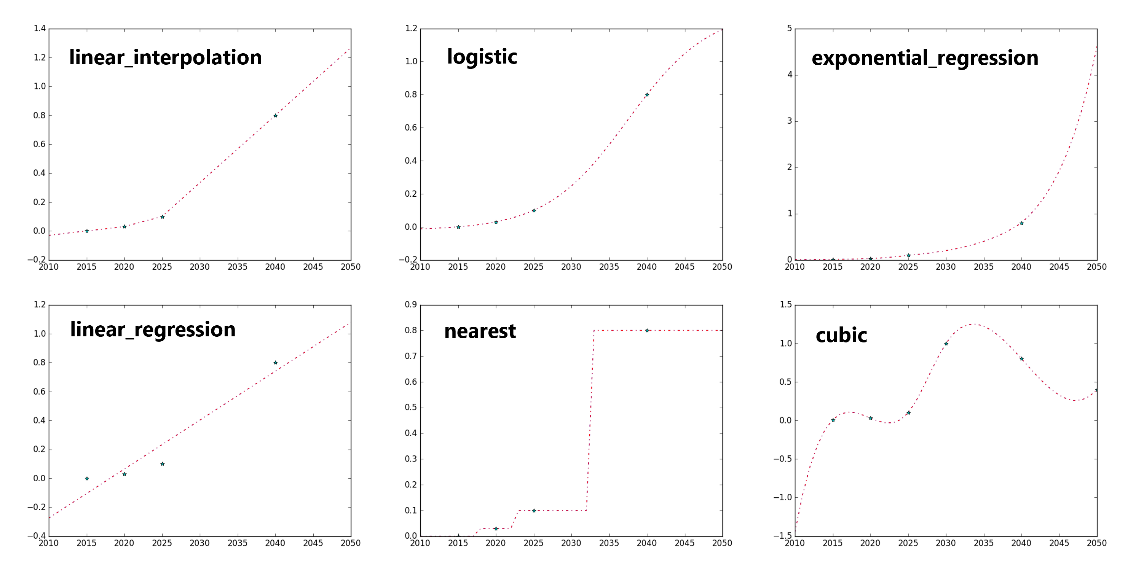
Graphical example of several interpolation/extrapolation methods. Provided data points are blue stars. Source: EnergyPATHWAYS Model Website.
is_levelized: is the capital cost annualized? (TRUE/FALSE)
is_stock_dependent: is total service demand dependent on size of stock? (TRUE or FALSE)
lifetime_variance: variance in lifetime of a technology in years
Note: user must either specify min and max lifetime or mean and variance
max_lifetime: maximum lifetime of technology in years
Note: user must either specify min and max lifetime or mean and variance
mean_lifetime: mean lifetime of technology in years
Note: user must either specify min and max lifetime or mean and variance
min_lifetime: minimum lifetime of technology in years
Note: user must either specify min and max lifetime or mean and variance
notes: user notes to document assumptions (not used for computations in model)
other_index_1
other_index_2
Optional additional index categories to maintain during calculations, e.g., in the residential sector, building type can be an additional level of grouping data and viewing results.
See the description of OtherIndexes.csv (Section OtherIndexes.csv) for more information on other indexes.
oth_1: one element from the other_index_1 category. Ex. If other_index_1 is ‘building_type’, oth_1 may be ‘detached single family’.
oth_2: analogous to oth_1 for other_index_2
sector: main groupings of energy consumption (e.g., in Net Zero Australia, these are productive, commercial, residential, and transportation)
sensitivity: sensitivity tag for the data input
E.g., for 2040 population, may have a high, medium, and low estimate depending on sensitivity (“low”, “medium [d]”, “high”)
[d] indicates default option for model to select (if not specified in runs_key file)
shape: hourly shape of the service demand for a sector, subsector, or technology
e.g., commercial_electricity, industry_electricity (productive sector), residential_elecricity
source: where the data/information came from (not used in model calculations)
stock_decay_function: models the rate at which vintaged stock decays and needs to be replaced. Three options are “linear,” “exponential,” and “weibull.” See Section Stock Rollover Calculation for more information on the stock rollover calculations.
subsector: sub-groupings of energy consumption (e.g., in Net Zero Australia, subsectors of the productive sector are specific industries, like the iron and steel industry).
vintage: sales year of technology
Database File-by-File Details
This section explores every database file, its purpose, and contents. Column headers without a description are featured as common terms in Section Common Terms in Database Files.
GeographiesSpatialJoin.csv
Purpose: Fundamental geography table. Indicates relevant geography types (geography), names (gau), time zones, and map keys to scale data between different granularities.
Figure below depicts a sample spatial join table for a preliminary China study. The column headers circled in red are the geography types (geography). In this case, data is only input on the national or provincial level. The analysis units (gau) associated with each type are listed below the headers. These include each individual province as well as the country as a whole (“china”). The column headers circled in blue are map keys (e.g., population, land area, occupied dwellings, steel production) with values for each region listed below them. Time zones are chosen from the time_zones.csv file that was installed from GitHub with the EnergyPATHWAYS model. It is featured in the energyPATHWAYS folder of the installation.
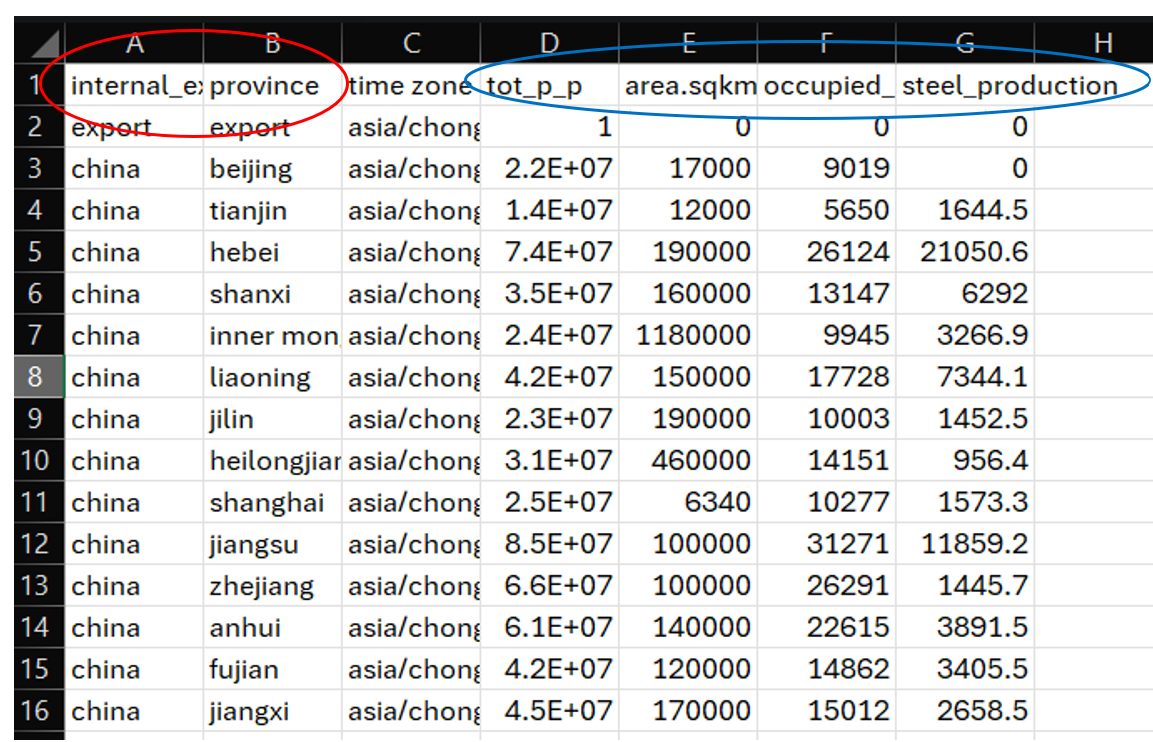
Sample geography spatial join table for a China study. Geography types are circled in red. Geography map keys are circled in blue.
Geographies.csv
Purpose: List relevant geographic types (geography) and regions (gau) for use in the database and model run.
Column Breakdown:
geography
gau
GeographyMapKeys.csv
Purpose: List relevant geography map keys for scaling data cross granularities.
Column Breakdown:
name: map key name (e.g., steel production 2023)
DemandDrivers.csv
Purpose: factors used to project energy and service demands over time. E.g., population, gross domestic product, square footage of commercial building types, vehicle miles traveled.
Column Breakdown:
name: driver name
base driver: is the driver specified in column A tied to a more fundamental driver?
E.g., a driver of households may have a base driver of population. To project household size into the future, the method explained in Section Demand Drivers will be used, with the driver being population.
input_type
unit_prefix: value of a single unit
E.g., does a value of “1” represent 1 person, 2 people, 3 people?
unit_base: what is the unit in question?
E.g., people, households, square meters of floor
geography
other_index_1
other_index_2
geography_map_key
interpolation_method
extrapolation_method
extrapolation_growth
source
notes
gau
oth_1
oth_2
year: year of data input
value: demand driver value (in relative or absolute units, as specified in Columns C-E)
E.g., annual population value
sensitivity
DemandEnergyDemands.csv
Purpose: Accounts for energy demand in subsectors without enough information for a stock/service demand calculation.
Column Breakdown:
subsector
is_stock_dependent
input_type
unit
driver_denominator_1
driver_denominator_2
driver_1
driver_2
driver_3
geography
final_energy_index: generally blank but unsure of exact purpose
demand_technology_index: generally blank but unsure of exact purpose
other_index_1
other_index_2
interpolation_method
extrapolation_method
extrapolation_growth
geography_map_key
source
notes
gau
oth_1
oth_2
final_energy
demand_technology
year
value: energy demand value for subsector (Column A), year (Column Z), and energy type (Column X) specified
AB. sensitivity
DemandEnergyEfficiencyMeasures.csv
Purpose: Allows user to change energy efficiency over time for subsectors that run with the simple energy demand method (those in DemandEnergyDemands.csv).
Column Breakdown:
name: measure name (a specific name like “DDP: food; beverages and tobacco” is helpful for understanding what is represented; DDP stands for “Deep Decarbonization Pathway” as opposed to REF which stands for “Reference.”)
subsector
input_type: efficiencies are always an intensity
unit: energy efficiencies are generally unitless (blank box)
geography
other_index_1
other_index_2
interpolation_method
extrapolation_method
extrapolation_growth
stock_decay_function: not used/outdated
min_lifetime: not used/outdated
max_lifetime: not used/outdated
mean_lifetime: not used/outdated
lifetime_variance: not used/outdated
source
notes
final_energy
gau
oth_1.
oth_2
year
value: energy efficiency gain by year specified. For example, a typical value is 0.310550914 in 2060 and 0 in 2023. This represents 1% annual efficiency gain from 2023 to 2060, since 1-0.992060-2023 = 0.310550914. The interpolation_method is used to fill in values for the intermediate years.
DemandEnergyEfficiencyMeasuresCost.csv
Purpose: Specification of the cost of induced efficiency improvement measures specified in DemandEnergyEfficiencyMeasures.csv.
Column Breakdown:
parent: measure name (from DemandEnergyEfficiencyMeausures.csv)
currency
currency_year
cost_denominator_unit
cost_of_capital
is_levelized
geography
other_index_1
other_index_2
interpolation_method
extrapolation_method
extrapolation_growth
source
notes
gau
oth_1
oth_2
vintage
value: cost of induced efficiency improvement measure in units of currency/cost_denominator_unit (e.g., 10 $/GJ)
final_energy: (empty for NZAu)
DemandFuelSwitchingMeasures.csv
Purpose: Allows user to control energy type (ex. force a transition from coal to electricity) in sectors that run with the simple energy demand method (those in DemandEnergyDemands.csv).
Column Breakdown:
name: measure name (a specific name like “DDP: food; beverages and tobacco” is helpful for understanding what is represented; DDP stands for “Deep Decarbonization Pathway” as opposed to REF which stands for “Reference.”)
subsector
final_energy_from: original energy type (e.g., diesel)
final_energy_to: new energy type (e.g., electricity)
stock_decay_function
min_lifetime
max_lifetime
mean_lifetime
lifetime_variance
DemandFuelSwitchingMeasuresCost.csv
Purpose: Incorporate cost of fuel switching measures specified in DemandFuelSwitchingMeasures.csv.
Column Breakdown:
parent: measure name (from DemandFuelSwitchingMeasures.csv)
currency
currency_year
cost_denominator_unit
cost_of_capital
is_levelized
geography
other_index_1
other_index_2
interpolation_method
extrapolation_method
extrapolation_growth:
source
notes
gau
oth_1
oth_2
vintage
value: cost of fuel switching measure in units of currency/cost_denominator_unit (e.g., 10 $/GJ)
DemandFuelSwitchingMeasuresEnergyIntensity.csv
Purpose: Specify change in energy intensity as a result of fuel switching measures specified in DemandFuelSwitchingMeasures.csv.
Column Breakdown:
parent: measure name (from DemandFuelSwitchingMeasures.csv)
geography
other_index_1
other_index_2
interpolation_method
extrapolation_method
extrapolation_growth
source
notes
gau
oth_1
oth_2
year
value: new energy intensity (relative to original fuel). For example, 0.5 indicates that total energy demand for this process/subsector dropped by 50% as a result of switching fuels. This could represent switching from coal blast furnaces to electric arc furnaces (EAFs) in the iron and steel sector, since EAFs consume less energy to produce the same amount of steel.
DemandFuelSwitchingMeasuresImpact.csv
Purpose: Allow users to control rate at which fuel switching measures in DemandFuelSwitchingMeasures.csv occur.
Column Breakdown:
parent: measure name (from DemandFuelSwitchingMeasures.csv)
input_type: intensities are always an intensity
unit: intensities are generally unitless (blank box)
geography
other_index_1
other_index_2
interpolation_method
extrapolation_method
extrapolation_growth
source
notes
gau
oth_1
oth_2
year
value: what proportion of old fuel has been replaced by new fuel in year specified
Ex. 0 indicates no replacement. 0.5 indicates 50% replacement of old fuel use with new fuel. 1 indicates full replacement of old fuel use with new fuel.
DemandServiceDemands.csv
Purpose: Outline annual service demands and projection methods.
Column Breakdown:
subsector
is_stock_dependent
input_type
unit: demand unit, e.g., available_seat_kilometer
driver_denominator_1
driver_denominator_2
driver_1
driver_2
driver_3
geography
final_energy_index: generally blank but unsure of exact purpose
demand_technology_index: generally blank but unsure of exact purpose
other_index_1
other_index_2
interpolation_method
extrapolation_method
extrapolation_growth
geography_map_key
source
notes
gau
final_energy
demand_technology
oth_1
oth_2
year
value: service demand value
AB. sensitivity
DemandServiceDemandMeasures.csv
Purpose: Allow user to alter the projection of service demand in a subsector. For example, if we project a 25% decline in vehicle miles traveled, we could enter that as a measure here.
Column Breakdown:
name: measure name (user is recommended to use informative name like “DDP_lowdemand: commercial air conditioning”)
subsector
input_type
unit
geography
other_index_1
other_index_2
interpolation_method
extrapolation_method
extrapolation_growth
stock_decay_function: not used/outdated
min_lifetime: not used/outdated
max_lifetime: not used/outdated
mean_lifetime: not used/outdated
lifetime_variance: not used/outdated
geography_map_key
Blank for NZAu
source
notes
gau
oth_1
oth_2
year
value: relative service demand growth (relative to 2020 baseline (0) in Australia)
e.g., value of 0.2 in 2050 and 0 in 2020 indicates a 20% decline in service demand from 2020-2050.
DemandServiceDemandMeasuresCost.csv
Purpose: Incorporate cost of service demand measures specified in DemandServiceDemandMeasures.csv.
Column Breakdown: *Note: Empty spreadsheet for NZAu
parent: relevant service measure
currency
currency_year
cost_denominator_unit
cost_of_capital
is_levelized
geography
other_index_1
other_index_2
interpolation_method
extrapolation_method
extrapolation_growth
source
notes
gau
oth_1
oth_2
vintage
value: cost of service demand measure in units of currency/cost_denominator_unit (e.g., $/km)
DemandServiceEfficiency.csv
Purpose: Allows for input of service efficiency for subsectors that run on the Service Demand and Efficiency method (when not enough information available for full stock rollover calculation).
Column Breakdown:
subsector: only used for “cement CO2 capture” for NZAu
energy_unit: ex. mmbtu
denominator_unit: ex. tonne (mmbtu/tonne overall unit)
geography
other_index_1
other_index_2
interpolation_method
extrapolation_method
extrapolation_growth
geography_map_key
source
notes
final_energy
gau
oth_1
oth_2
year
value: service efficiency in units of energy_unit/denominator_unit (e.g., J/km)
sensitivity
DemandServiceLink.csv
Purpose: Specify relationships in service demand between subsectors. For example, the user can control what percentage of hot water service demand comes from clothes washing. Thus, if service demand for clothes washing drops, hot water service demand also drops according to the service demand ratio.
Column Breakdown:
name: user-created name of service demand linkage (e.g., “dem_svc_link_1”, “dem_svc_link_2,” …)
subsector: affecting subsector (e.g., if clothes washing contributes to hot water demand, clothes washing would be the affecting subsector since it affects hot water demand)
linked_subsector: affected subsector (e.g., if clothes washing contributes to hot water demand, hot water would be the affected subsector since its service demand was impacted by clothes washing service demand.)
service_demand_share: Value is ratio of shared service demand. For example, If the subsector is “residential clothes washing” and the linked subsector is “residential water heating,” a value of “0.25” specifies that 25% of hot water demand is from clothes washing. So, if clothes washing goes down 100% in service demand (is eliminated), hot water service demand drops 25%.
year
DemandStock.csv
Purpose: Define stock of technologies for each subsector.
Column Breakdown:
subsector
is_stock_dependent
driver_denominator_1
driver_denominator_2
driver_1
driver_2
driver_3
geography: geographical category of data input
other_index_1
other_index_2
geography_map_key
input_type
demand_stock_unit_type: unit type (generally “equipment”)
unit: stock unit (ex. truck)
time_unit: if time is relevant to stock unit
interpolation_method
extrapolation_method
extrapolation_growth
specify_stocks_past_current_year: do you want to specify stock past the current year? (ex. specify 2050 stock breakdown) (TRUE/FALSE)
source
notes
gau
oth_1
oth_2
demand_technology
year
value: stock quantity
AB. sensitivity
DemandStockMeasures.csv
Purpose: Allows user to directly control stock composition (as opposed to sales measures) (only used for “2017 AEO Res Distillate Boiler” in NZAu)
Column Breakdown:
name: technology name
subsector
geography
other_index1
demand_technology
interpolation_method
extrapolation_method
extrapolation_growth
source
notes
gau
oth_1
year
value: stock size in year specified (only zeros used in NZAu)
DemandSales.csv
Purpose: If there are no technological classifications of historical stock data, the model will not know how to replace decayed technology in the baseline rollover (the rollover without the use of any sales share measures). An input to DemandSales.csv specifies this baseline rollover rate.
Column Breakdown:
subsector
geography
other_index_1
other_index_2
input_type
interpolation_method
extrapolation_method
extrapolation_growth
source
notes
gau
oth_1
oth_2
demand_technology
vintage
value: proportion of sales made up by demand_technology (Column N) in vintage year (Column O).
sensitivity
DemandTechs.csv
Purpose: Specify relevant demand technologies for the model. A demand technology is a device that uses energy to meet a service demand.
Column Breakdown:
name: relevant technology (e.g., Electric Transit Bus)
linked: technology that the current technology is linked to. For example, a heat pump that provides heating is also linked to a heat pump that provides cooling.
stock_link_ratio: controls ratio of stock between linked technologies
subsector
source
additional_description: user notes (not used by model)
demand_tech_unit_type: technology unit type (only “equipment” used in NZAu)
unit: technology unit (e.g., bus, truck, motorcycle)
time_unit: time unit if relevant (blank for NZAu)
cost_of_capital
stock_decay_function
min_lifetime
max_lifetime
mean_lifetime
lifetime_variance
shape
DemandTechsAirPollution.csv
Purpose: Specify air pollutant emissions for technologies listed in DemandTechs.csv.
Column Breakdown:
demand_technology
definition: is the value “absolute” or “relative” to another demand technology
reference_tech: reference technology (if definition is relative)
mass_unit: unit of mass for pollutant ex. kilogram
energy_unit: ex. mmbtu
geography
other_index1: “air pollution” for this data sheet
other_index2: blank for this sheet
interpolation_method
extrapolation_method
extrapolation_growth
source
notes
gau
oth_1: specific pollutant for this data row (ex. Nox, PM2.5, Sox)
oth_2: blank for this sheet
final_energy
vintage
year
value: pollutant value in units of mass_unit/energy_unit (ex. 0.35 kg Nox/mmbtu for gasoline LDV vintage 1960 in 1990 Australia)
sensitivity
DemandTechsCapitalCost.csv
Purpose: Specification of capital costs for demand technologies listed in DemandTechs.csv.
Column Breakdown:
demand_technology
definition: absolute or relative
If “relative” definition, specify a reference technology in column C and a conversion operation in column M. For example, an operation of “multiply” in column M will multiply the reference technology’s value by the relative value in column U to obtain this technology’s absolute value.
reference_tech
geography
other_index_1
other_index_2
currency
currency_year
is_levelized
interpolation_method
extrapolation_method
extrapolation_growth
reference_tech_operation: only “multiply” used in NZAu.
source
notes
new_or_replacement: is technology cost in column U for a “new” installation or “replacement” for a decayed technology? (replacements may have lower costs)
gau
oth_1
oth_2
vintage
value: see note under B for specifics on relative value (relative to specified reference technology by operation specified in M)
sensitivity
DemandTechFixedMaintenanceCost.csv
Purpose: Specification of maintenance costs for demand technologies listed in DemandTechs.csv.
Column Breakdown:
demand_technology
definition: “absolute” or “relative” (relative to reference technology in column C)
reference_tech
geography
other_index_1
other_index_2
currency
currency_year
interpolation_method
extrapolation_method
extrapolation_growth
age_growth_or_decay_type
age_growth_or_decay
additional_description: same as notes
source
notes
gau
oth_1
oth_2
vintage
value: cost value in absolute units or relative to reference technology, as specified by Column B
sensitivity
DemandTechsFuelSwitchCost.csv
Purpose: Specification of fuel switching costs for demand technologies listed in DemandTechs.csv.
Column Breakdown:
demand_technology
definition: absolute or relative (to reference technology specified in column C)
reference_tech
geography
other_index_1
other_index_2
currency
currency_year
is_levelized
interpolation_method
extrapolation_method
extrapolation_growth
source
notes
gau
oth_1
oth_2
vintage
value: fuel switch cost in absolute units or relative to reference tech, as specified in Column B
sensitivity
DemandTechsIncentive.csv
Purpose: Specification of incentives for demand technologies listed in DemandTechs.csv (blank for NZAu study)
Column Breakdown:
demand_technology
incentive_type: no examples to base on in NZAu
apply_lesser_of_incentives
include_capital_cost: TRUE/FALSE
include_installation_cost: TRUE/FALSE
include_fuel_switching_cost: TRUE/FALSE
source
notes
geography
other_index_1
other_index_2
currency
currency_year
is_levelied
interpolation_method
extrapolation_method
extrapolation_growth
gau
oth_1
oth_2
vintage
value (in units of currency?)
sensitivity
DemandTechsInstallationCost.csv
Purpose: Specify installation costs for demand technologies listed in DemandTechs.csv.
Column Breakdown:
demand_technology
definition: absolute or relative (to reference technology in C)
reference_tech
geography
other_index_1
other_index_2
currency
currency_year
is_levelized
interpolation_method
extrapolation_method
extrapolation_growth
source
notes
new_or_replacement: is technology new or replacing an existing technology?
gau
oth_1
oth_2
vintage
value: installation cost in currency specified (and absolute or relative units as specified in Column B)
sensitivity
DemandTechsMainEfficiency.csv
Purpose: Specify primary efficiencies of demand technologies listed in DemandTechs.csv.
Column Breakdown:
demand_technology
definition: absolute or relative (to reference technology in C)
reference_tech
geography
other_index_1
other_index_2
final_energy
utility_factor: energy carrier utility factor. This value allocates a share of a technology’s service demand to a specific energy type. For example, a dual fuel technology might use one fuel with one efficiency value half the time and another fuel with a different efficiency value the rest of the time. In this case, the technology would have one line in DemandTechsMainEfficiency.csv and another line in DemandTechsAuxEfficiency.csv to account for both efficiency values. The utility factor x service demand will determine how much of the service demand is met by the “main” efficiency and energy type. The remaining service demand is allocated to the “auxiliary” efficiency and energy type. See Net Zero America Annex A.2, 2020, p. 54 for more information.
is_numerator_service: TRUE/FALSE - is numerator (instead of denominator) the service unit?
Ex: lightbulb service demand is in lumens. Efficiency is recorded in lumens/watt. Therefore, the numerator (lumens) is the service unit à TRUE.
Counter-Ex: refrigerator service demand is cubic feet. Efficiency is recorded in kwh/cubic foot. Therefore, the denominator (cubic feet) is the service unit à FALSE
numerator_unit: ex. if efficiency in lumens/watt, numerator_unit is lumen or lumen_hour
denominator_unit ex. if efficiency in lumens/watt, deominator_unit is watt or watt_hour
interpolation_method
extrapolation_method
extrapolation_growth
age_growth_or_decay_type
age_growth_or_decay
geography_map_key
source
notes
gau
oth_1
oth_2
vintage
value: efficiency value in units of numerator_unit/denominator_unit
sensitivity
DemandTechsAuxEfficiency.csv
Purpose: Secondary efficiency specification for technologies with two relevant efficiencies (e.g., dual fuel technologies). See note under utility_factor in Section DemandTechsMainEfficiency.csv for more information.
Column Breakdown:
demand_technology
definition: absolute for both technologies used in NZAu
reference_tech: reference technology specification for a non-reference technology (blank for NZAu study)
geography
other_index_1
other_index_2
final_energy
demand_tech_efficiency_types: blank in NZAu
is_numerator_service: TRUE/FALSE - is numerator (instead of denominator) the service unit?
E.g., lightbulb service demand is in lumens. Efficiency is recorded in lumens/watt. Therefore, the numerator (lumens) is the service unit à TRUE.
Counter-Example: refrigerator service demand is cubic feet. Efficiency is recorded in kwh/cubic foot. Therefore, the denominator (cubic feet) is the service unit à FALSE
numerator_unit: ex. if efficiency in lumens/watt, numerator_unit is lumen
denominator_unit ex. if efficiency in lumens/watt, deominator_unit is watt
interpolation_method
extrapolation_method
extrapolation_growth
age_growth_or_decay_type
age_growth_or_decay
shape
source
notes
gau
oth_1
oth_2
vintage
value: auxiliary efficiency value in units of numerator_unit/denominator_unit
if numerator_unit = denominator_unit (e.g., both btu), then efficiency is unitless
sensitivity
DemandTechsParasiticEnergy.csv
Purpose: Factor in parasitic energy losses for technologies listed in DemandTechs.csv. Parasitic energy loss is energy that the technology produces that does not directly contribute to meeting service demand. In NZAu, this sheet was only used for Heat Pump and Natural Gas Furnace. Why can we not just factor this into efficiency?
Column Breakdown:
demand_technology
definition: absolute or relative (to reference technology in C)
reference_tech
geography
other_index_1
other_index_2
energy_unit
time_unit
interpolation_method
extrapolation_method
extrapolation_growth
age_growth_or_decay_type
age_growth_or_decay
source
notes
gau
oth_1
oth_2
final_energy
vintage
value: energy loss rate in units of energy_unit/time_unit
sensitivity
DemandTechsServiceDemandModifier.csv
Purpose: Without service demand modifiers, service demand is allocated to technologies in proportion to stock. This input allows the user to control how technologies in DemandTechs.csv absorb the service demand (e.g., new cars are driven more than old cars).
Column Breakdown:
demand_technology
geography
definition: absolute or relative (to reference technology in D)
reference_tech
other_index_1
other_index_2
interpolation_method
extrapolation_method
extrapolation_growth
source
notes
gau
oth_1
oth_2
vintage
year
value: Without service demand modifiers, service demand is allocated to technologies in proportion to stock. This value is a weighting factor for allocating service demand to technology stock. See Net Zero America Annex A.2, 2020, p. 49 for use in equation and p. 52-54 for more information on service demand modifiers.
Sensitivity
DemandTechsServiceLink.csv
Purpose: Ryan Jones will follow-up on this control.
Column Breakdown:
Name
service_link
demand_technology
definition: all absolute in NZAu study
reference
geography
other_index_1
other_index_2
interpolation_method
extrapolation_method
extrapolation_growth
age_growth_or_decay_type
age_growth_or_decay
source
notes
gau
oth_1
oth_2
vintage
value
sensitivity
Shapes.csv
Purpose: Specify demand temporal shapes for use in data sheets.
Column Breakdown:
name: shape name
correspond to file names in the ShapeData folder of the database, which has a .csv file for each temporal demand shape. For example, the file residential_electricity.csv has normalized power demand values for every hour of the year for several geographical regions.
shape_type: “time slice” or “weather date”
“weather date” indicates that the shape has specific values for every hour of the year (e.g., residential_power.csv)
“time slice” indicates different temporal scaling (e.g., EV.csv contains demand data by workday and non-workday).
shape_unit_type: all “power” in NZAu
time_zone: time zones are chosen from the time_zones.csv file that was installed from GitHub with the EnergyPATHWAYS model. It is featured in the energyPATHWAYS folder of the installation.
geography
other_index_1
other_index_2
geography_map_key
interpolation_method
extrapolation_method
input_type
supply_or_demand: “d” for demand in all NZAu shapes
is_active: TRUE for all NZAu shapes (you can probably disable these if desired)
DispatchFeedersAllocation.csv
Purpose: Breakdown of electricity supply to each subsector (e.g., 100% residential, 50% residential and 50% productive)
Column Breakdown:
subsector
geography
geography_map_key
input_type
interpolation_method
extrapolation_method
source
notes
gau
dispatch_feeder: which sector’s electricity demand shape to follow
year
value: proportion of electricity that comes from dispatch_feeder (e.g., “1” indicates all electricity is from specified demand shape in dispatch_feeder, 0.5 indicates 50% is from dispatch_feeder)
sensitivity
DemandSectors.csv
Purpose: list primary groupings of demand (commercial, productive, residential, transportation in Net Zero Australia)
Column Breakdown:
name
shape
max_lead_hours: not sure (empty for NZAu)
max_lag_hours: not sure (empty for NZAu)
DemandSubsectors.csv
Purpose: Outline secondary energy demand groupings used for data input/analysis in model.
Column Breakdown:
name: subsector name
sector: (productive, commercial, residential, commercial used in NZAu)
cost_of_capital
sub_type: method for projecting demand (based on data availability)
Stock and Service (most preferred)
Stock and Energy Demand
Service and Energy Demand
Energy Demand (least preferred)
shape
override_service_demand_unit: specify a unit for a specific subsector (ex. residential freezing/refrigeration can be forced into units of cubic_foot)
FinalEnergy.csv
Purpose: Specify final energy types/details
Column Breakdown:
name: final energy type name
blend_group: relevant blend group (ex. A: gasoline à B: gasoline blend)
unit_type: mainly mass or energy (mass mainly for CO2)
reverse_sign_EP2RIO: not sure but FALSE for all NZAu. This is likely no concern if not exporting results to RIO.
shape: if relevant (for electricity used bulk_electricity in NZAu)
CurrenciesConversion.csv
Purpose: Convert different currencies used in input data to USD (or other common currency).
Column Breakdown:
currency (x)
year
value relative to USD in respective year (x/USD)
USD has value of 1 for each year.
InflationConversion.csv
Purpose: Allow older currencies to be adjusted to account for inflation in comparison.
Column Breakdown:
currency: only USD used for NZAu (other currencies can be used in the model but are adjusted for inflation according to the USD inflation and the currency’s annual exchange rate with the USD).
year
value: not sure what relative to (perhaps each other?)
OtherIndexes.csv
Purpose: Outline additional index (data grouping) options for use in data sheets. For example, it may be useful to view results of the residential building sector by building type. Here, “building_type” can be created as an index by listing it in the other_index column. The name of each specific building type, like “high-rise,” would be in name.
Data input into other sheets can be classified in this way by putting the “building_type” option in the other_index_1 or other_index_2 column and the specific name in the oth_1 or oth_2 column. These do not affect the model run and just help to classify and sort data and results. A prominent index example in the model is the index of geography where each individual element (name) is a gau.
Column Breakdown:
name: see “purpose” for explanation
other_index: see “purpose” for explanation